论文信息
信息概览
3DV 2025 Oral
论文题目: SceneMotifCoder: Example-driven Visual Program Learning for Generating 3D Object Arrangements
论文单位: Simon Fraser University
是否开源: 是
总结:
文生图,生成物理上合理的多对象排列,比如对于像堆叠的盘子或书籍排列等几何约束较强的物体。
利用大型语言模型 (LLM) 的代码生成功能来创建可视化程序,以捕获常见 3D 对象排列的抽象。
论文思路
问题的定义
网络输入一个自然语言的文本描述,描述了希望生成的3D物体布局。例如,一个文本描述可能是“在桌面上排列几本书,书的背面朝向相同”,或“堆叠几个盘子,每个盘子稍微偏离前一个盘子”。
然后输出是一个3D物体布局,生成的布局根据输入的文本描述进行物体的排列和分布。这个布局是通过“视觉程序”表示的,通常包括了物体的位置信息、朝向、尺寸等细节。该布局必须符合文本描述的要求,同时保证物理可行性(例如避免物体重叠、确保平衡等)
网络的训练
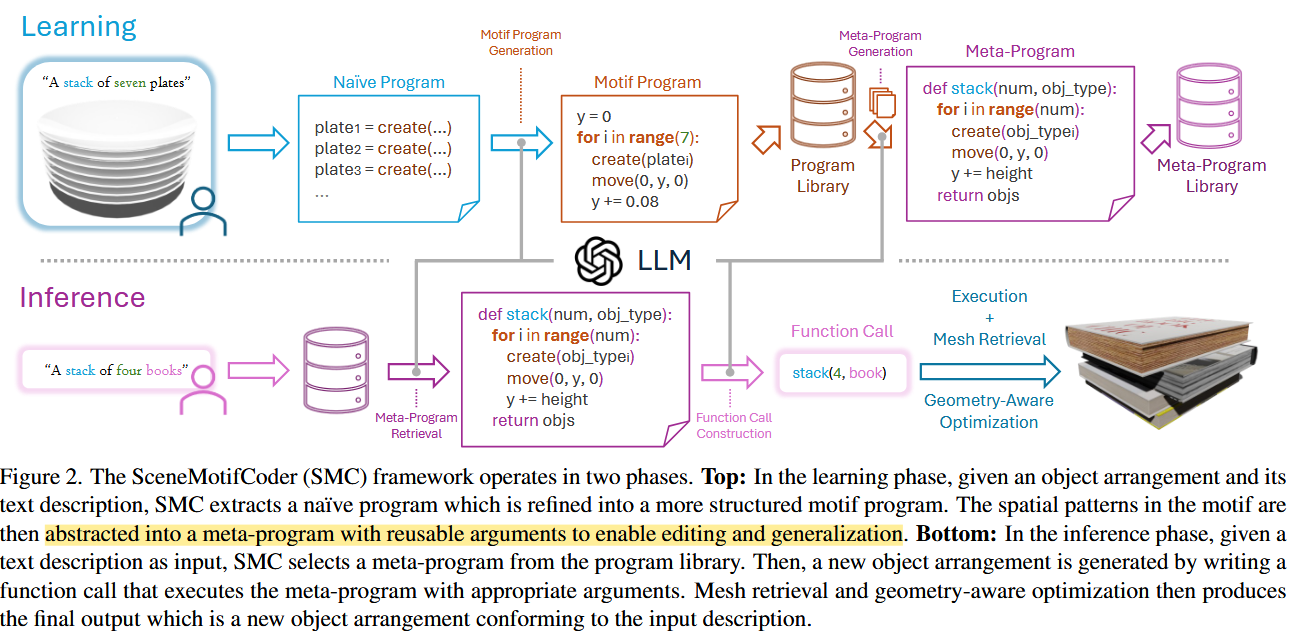
SMC的学习过程分为两个阶段:学习阶段和推理阶段。
学习阶段
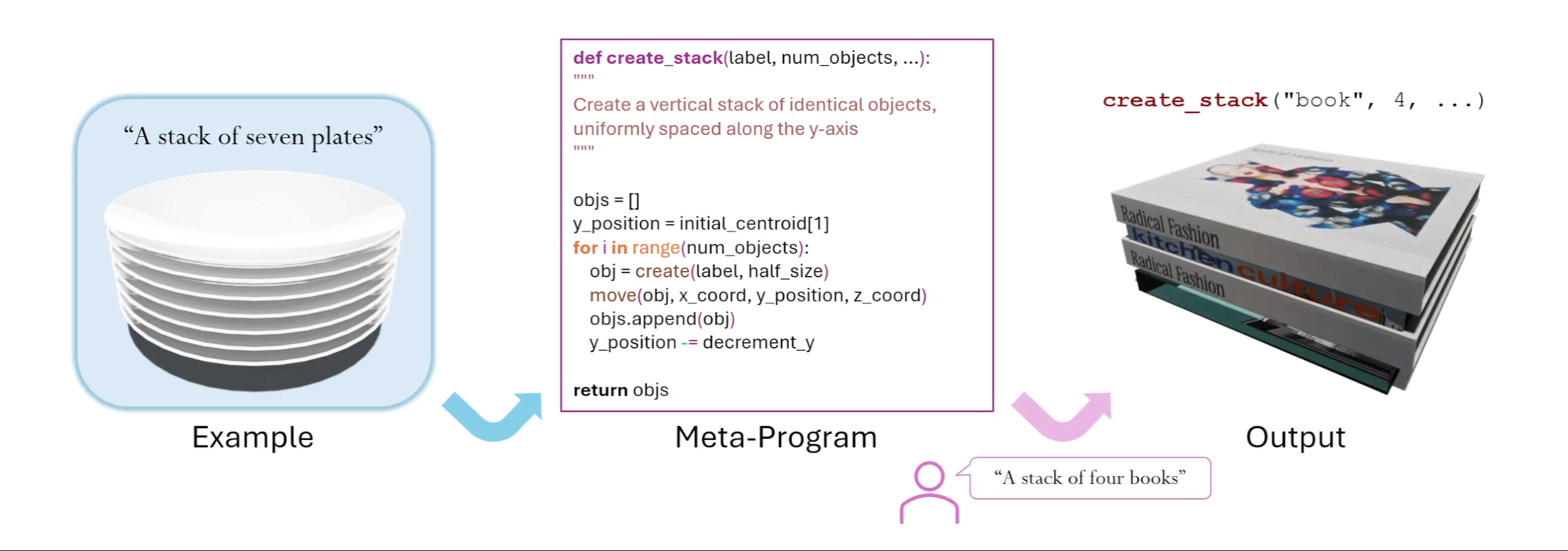
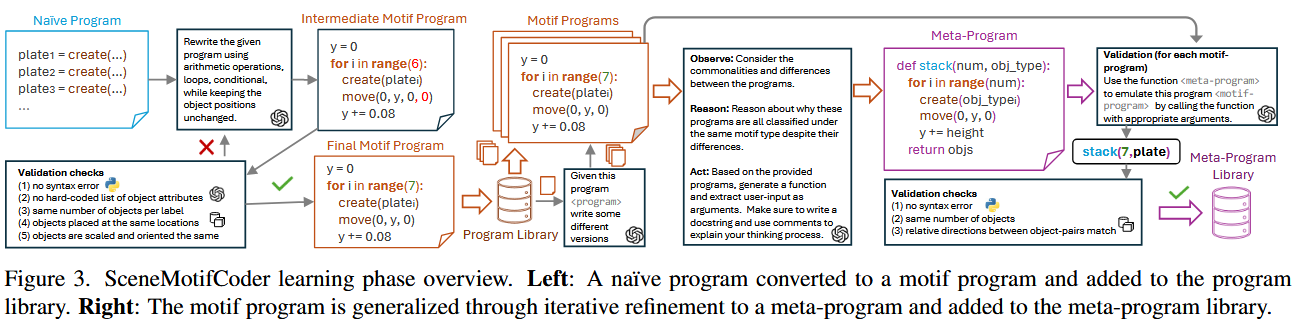
在学习阶段,SMC通过给定的物体布局示例来学习一个“motif程序”。
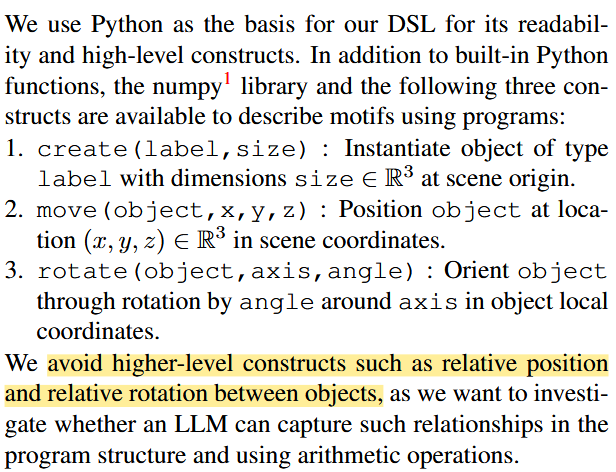
描述了物体的大小,位置等参数,不过这里的坐标,旋转都是与世界系对齐的,没有引入相对描述,例如“物体A放置在物体B的右侧”或“物体C的底部与物体D的顶部对齐”。
首先,SMC从示例布局生成一个初步的程序$P_0$,这个程序可能会较为简单或不完全准确。
然后,系统会根据这些示例优化程序,精炼出一个“motif程序”。这个程序可以描述物体如何在3D空间中排列。
最终,程序会被推广为一个元程序(meta-program),这个元程序能够生成布局的多种变体。这使得系统能够从少量的示例中学习到更为普遍的排列规律,并能够在面对新任务时进行推理和生成。
在这个过程中,SMC使用大语言模型(LLM)来生成和合成程序。程序的生成是通过逐步优化和学习来完成的,从而能够对输入的文本描述进行有效的映射。
learning框架
代码测试
输入数据
从"a stack of seven plates"这个glb模型出发,学习一个元程序
1
|
python learn.py --file examples/a_stack_of_seven_plates.glb --desc "a stack of seven plates"
|
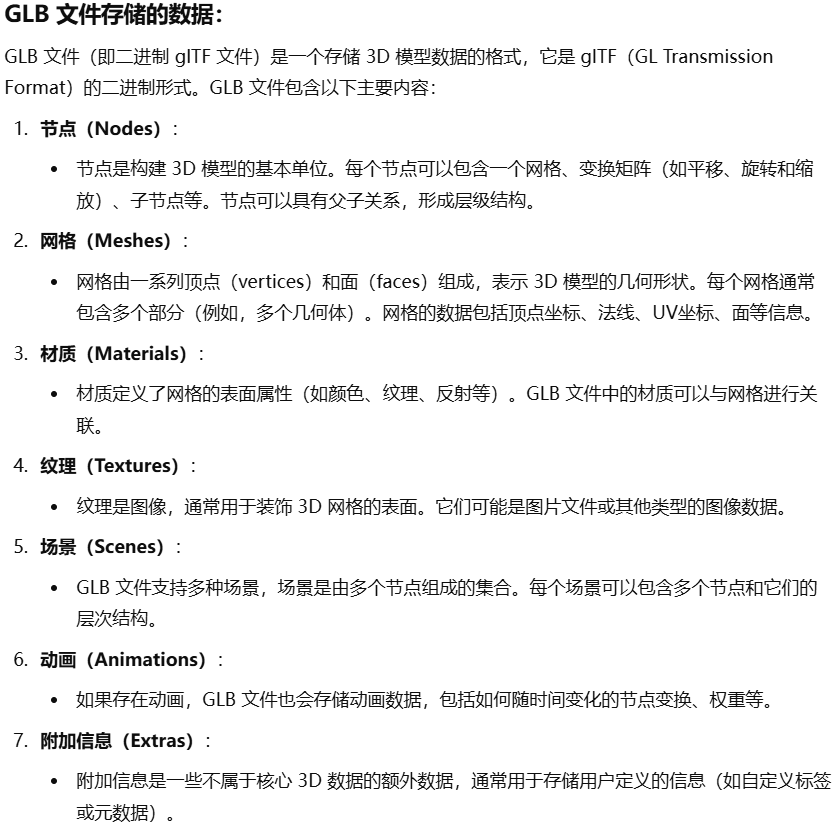
首先会加载保存的数据,比如这里是七个盘子,那就是七种mesh,然后还会从这七个盘子中挑一个盘子出来作为世界坐标系,这样其他盘子的网格坐标都会需要一个转换。
 1
 2
 3
 4
 5
 6
 7
 8
 9
10
11
12
13
14
15
16
17
18
19
20
21
22
23
24
25
26
27
28
29
30
31
32
33
34
35
36
37
38
39
40
41
42
43
44
45
46
47
48
49
50
51
52
53
54
55
56
57
58
59
60
61
62
63
64
65
66
67
68
69
70
71
72
73
74
|
def load_glb(file_path: str) -> tuple[gltf.GLTF2, list[Obj]]:
    '''
    Load a glb file.

    Args:
        file_path: string, the path to the glb file

    Returns:
        glb_file: GLTF2, the glTF 2.0 file
        objs_in_file: list, the objects in the file
    '''

    # TODO: Make less assumptions about the structure of the glTF file

    glb_file = gltf.GLTF2().load(file_path)
    objs_in_file: list[Obj] = []

    # Load the main scene and the scene's world nodes
    all_nodes = glb_file.nodes
    main_scene = glb_file.scenes[glb_file.scene]
    world_node_ids = main_scene.nodes

    # Load the objects in the world nodes
    for world_node_id in world_node_ids:
        main_node_ids = all_nodes[world_node_id].children

        # Load the objects in the main nodes
        # Each main node is a separate object
        for main_node_id in main_node_ids:
            main_node = all_nodes[main_node_id]

            # ----- Matrix -----
            # Note: This logic is not general!
            # Assumes that the mesh_root_node has a matrix for the mesh
            # And the main_node has a matrix for placing the mesh in the world
            if main_node.matrix:
                main_node_matrix = np.array(main_node.matrix).reshape(4, 4, order="F")
            else:
                translation = main_node.translation if main_node.translation else [0, 0, 0]
                rotation = main_node.rotation if main_node.rotation else [1, 0, 0, 0]
                scale = main_node.scale if main_node.scale else [1, 1, 1]
                translation_matrix = trimesh.transformations.translation_matrix(translation)
                rotation_matrix = trimesh.transformations.quaternion_matrix(rotation)
                scale_matrix = np.diag(scale + [1])
                main_node_matrix = translation_matrix @ rotation_matrix @ scale_matrix

            if len(main_node.children) > 0:
                mesh_root_node_matrix = all_nodes[main_node.children[0]].matrix
                if mesh_root_node_matrix is not None:
                    mesh_root_node_matrix = np.array(mesh_root_node_matrix).reshape(4, 4, order="F")
            else:
                mesh_root_node_matrix = None

            # ----- Mesh -----
            main_node_mesh = _load_all_meshes(glb_file, main_node)

            # Apply the mesh_root_node_matrix if it exists
            if mesh_root_node_matrix is not None:
                main_node_mesh.apply_transform(mesh_root_node_matrix)

            # ----- Bounding box -----
            # Compute the oriented bounding box of the mesh
            centroid = main_node_mesh.bounding_box_oriented.centroid + main_node_matrix[:3, 3]
            half_size = main_node_mesh.bounding_box_oriented.extents / 2
            main_node_bounding_box = BoundingBox(centroid, half_size, main_node_matrix[:3, :3])

            # ----- Obj -----
            # TODO: Allow the label to be provided separately
            label = main_node.extras["semantics"]["label"] if "semantics" in main_node.extras else "unknown"

            obj = Obj(label, main_node_bounding_box, main_node_mesh, main_node_matrix)
            objs_in_file.append(obj)

    return glb_file, objs_in_file
|
生成naive的代码
将一个 Arrangement 对象转换成一个 Program 对象。具体来说,它通过解析 Arrangement 中的每个 Object,并生成一系列代码,描述如何通过平移和旋转操作来创建这些对象并将它们放置到正确的位置和姿态。
 1
 2
 3
 4
 5
 6
 7
 8
 9
10
11
12
13
14
15
16
17
18
19
20
21
22
23
24
25
26
27
28
29
30
31
32
33
34
35
36
37
38
39
40
41
42
|
def from_arrangement(cls, arrangement: Arrangement) -> Program:
    '''
    Create a program from an arrangement.

    Args:
        arrangement: Arrangement, an arrangement of objects

    Returns:
        program: Program, the program of the arrangement
    '''

    code = []
    code.append("objs = []")

    for i, obj in enumerate(arrangement.objs):
        label = obj.label
        centroid = obj.bounding_box.centroid.tolist()
        half_size = obj.bounding_box.half_size.tolist()
        coord_axes = obj.bounding_box.coord_axes

        # The object is initially aligned with the canonical coordinate system, so we need to rotate it to the correct orientation
        # For user convenience, the rotation operation is decomposed into three rotations around the x, y, and z axes
        # Here, we need to extract the three rotation angles needed to rotate the object to the correct orientation
        # In particular, we expect most objects only has a single rotation around the up axis (y axis), so we choose a rotation order of YXZ
        rotation_matrix = coord_axes
        y_angle = np.arctan2(rotation_matrix[0, 2], rotation_matrix[2, 2])
        x_angle = np.arcsin(-rotation_matrix[1, 2])
        z_angle = np.arctan2(rotation_matrix[1, 0], rotation_matrix[1, 1])

        code.append(f"obj_{i+1}_half_size = {half_size}")
        code.append(f"obj_{i+1}_centroid = {centroid}")
        code.append(f"obj_{i+1} = create('{label}', obj_{i+1}_half_size)")
        code.append(f"move(obj_{i+1}, obj_{i+1}_centroid[0], obj_{i+1}_centroid[1], obj_{i+1}_centroid[2])")

        for axis, angle in [("y", y_angle), ("x", x_angle), ("z", z_angle)]:
            if abs(angle) > 1e-5:
                code.append(f"rotate(obj_{i+1}, '{axis}', {np.rad2deg(angle).round(1)})")

        code.append(f"objs.append(obj_{i+1})")

    program = Program(code, arrangement.description)
    return program
|
对于上述输入的例子,结果为
 1
 2
 3
 4
 5
 6
 7
 8
 9
10
11
12
13
14
15
16
17
18
19
20
21
22
23
24
25
26
27
28
29
30
31
32
33
34
35
36
37
|
Naive program:
objs = []
obj_1_half_size = [0.08909, 0.0143, 0.08853]
obj_1_centroid = [0.0, 0.0, 0.0]
obj_1 = create('plate', obj_1_half_size)
move(obj_1, obj_1_centroid[0], obj_1_centroid[1], obj_1_centroid[2])
objs.append(obj_1)
obj_2_half_size = [0.08909, 0.0143, 0.08853]
obj_2_centroid = [0.0, -0.00757, 0.0]
obj_2 = create('plate', obj_2_half_size)
move(obj_2, obj_2_centroid[0], obj_2_centroid[1], obj_2_centroid[2])
objs.append(obj_2)
obj_3_half_size = [0.08909, 0.0143, 0.08853]
obj_3_centroid = [0.0, -0.01514, 0.0]
obj_3 = create('plate', obj_3_half_size)
move(obj_3, obj_3_centroid[0], obj_3_centroid[1], obj_3_centroid[2])
objs.append(obj_3)
obj_4_half_size = [0.08909, 0.0143, 0.08853]
obj_4_centroid = [0.0, -0.02272, -0.0]
obj_4 = create('plate', obj_4_half_size)
move(obj_4, obj_4_centroid[0], obj_4_centroid[1], obj_4_centroid[2])
objs.append(obj_4)
obj_5_half_size = [0.08909, 0.0143, 0.08853]
obj_5_centroid = [0.0, -0.03029, -0.0]
obj_5 = create('plate', obj_5_half_size)
move(obj_5, obj_5_centroid[0], obj_5_centroid[1], obj_5_centroid[2])
objs.append(obj_5)
obj_6_half_size = [0.08909, 0.0143, 0.08853]
obj_6_centroid = [0.0, -0.03786, -0.0]
obj_6 = create('plate', obj_6_half_size)
move(obj_6, obj_6_centroid[0], obj_6_centroid[1], obj_6_centroid[2])
objs.append(obj_6)
obj_7_half_size = [0.08909, 0.0143, 0.08853]
obj_7_centroid = [0.0, -0.04544, 0.0]
obj_7 = create('plate', obj_7_half_size)
move(obj_7, obj_7_centroid[0], obj_7_centroid[1], obj_7_centroid[2])
objs.append(obj_7)
|
high-level的观察
 1
 2
 3
 4
 5
 6
 7
 8
 9
10
11
12
13
14
15
16
|
def make_high_level_observations(llm_session: gpt.Session, naive_program: Program) -> None:
    '''
    Prompt the LLM to make high level observations of the naive program.

    Args:
        llm_session: Session, the LLM session
        naive_program: Program, the naive program to observe

    Returns:
        None
    '''

    llm_session.send("optimize_highlevel_count", {"program": naive_program.code_string, "description": naive_program.description})
    llm_session.send("optimize_highlevel_general_pattern", {"description": naive_program.description})
    llm_session.send("optimize_highlevel_xyz_pattern")
    llm_session.send("optimize_highlevel_xyz_displacements")
|
比如给gpt的prompt是:
‘Below is a program about a spatial motif of “a stack of seven plates”. Describe how many object types and how many are there for each type. Respond with a json-like text structure with the object types as keys and the counts as values. Here is the program: (naive的程序)
返回的结果如下:
在有了high-level的观察之后,调用大语言模型(LLM)对一个排列描述(description)进行图案类型(motif type)分类,并确保分类结果是有效的。
 1
 2
 3
 4
 5
 6
 7
 8
 9
10
11
12
13
14
15
16
17
18
19
20
21
22
23
24
25
|
def classify_motif_type(llm_session: gpt.Session, description: str) -> str:
    '''
    Prompt the LLM to classify the motif type of the description.

    Args:
        llm_session: Session, the LLM session
        description: string, the description of the arrangement

    Returns:
        motif_type: string, the classified motif type
    '''

    with open("motif_types.yaml", "r") as f:
        motif_types = yaml.safe_load(f)["types"].keys()

    # ----- Validation function for this task -----
    def classify_validation(response: str) -> tuple[bool, str, int]:
        motif_type = response.strip().lower()
        valid = motif_type in motif_types or (motif_type.startswith("letter_") and motif_type[-1] in "abcdefghijklmnopqrstuvwxyz")
        error_message = f"The motif type '{motif_type}' is invalid. Valid motif types are: {motif_types}" if not valid else ""
        return valid, error_message, -1
    # ----- End of validation function -----

    motif_type = llm_session.send_with_validation("classify", {"description": description}, classify_validation)
    return motif_type
|
也就说,物体的排列必须是以下几种排列之一。
 1
 2
 3
 4
 5
 6
 7
 8
 9
10
11
12
13
14
|
types:
  stack: multiple objects of the same type are placed orderly on top of each other
  pile: objects are placed on top of each other but not in an orderly manner (when in doubt between stack and pile, choose pile if the description contains the word "pile" explicitly)
  row: objects are placed next to each other in a row
  grid: objects are placed orderly in a grid, like a chessboard
  left_of: one object placed to the left of another object
  in_front_of: one object placed in front of another object
  on_top: one object placed on top of another object
  surround: objects are placed around a central object in a circular manner
  wall_vertical_column: objects are placed in a column from top to bottom vertically on a wall
  wall_horizontal_row: objects are placed in a row from left to right vertically on a wall
  wall_grid: objects are placed in a grid orderly and vertically on a wall (when in doubt between grid and wall_grid, choose wall_grid if the objects are placed on a wall)
  letter: objects are placed to form a letter of the alphabet
  rectangular_perimeter: objects are placed around the perimeter of a rectangular shape, facing inward
|
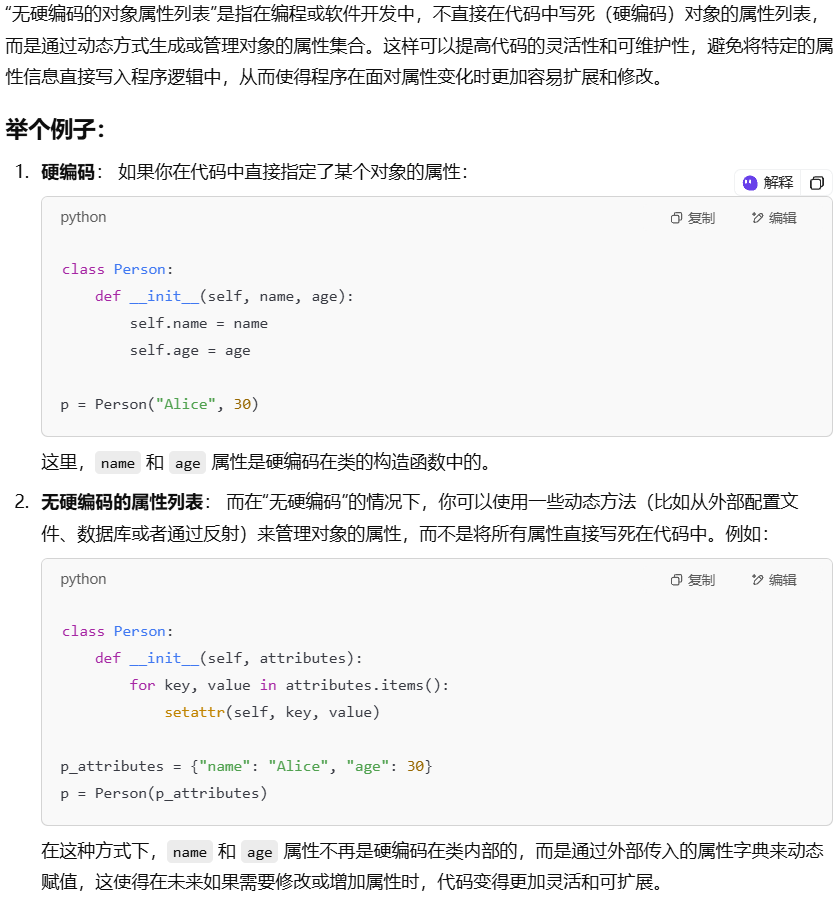
验证了物体排列合理性后,结合前文物体排序之类的信息,再去问gpt,优化出更高级的程序,比如之前naive的程序有7个create_plate,这一步会把该结构优化为for循环的结构,这样更加利于gpt捕捉空间中的高维结构。当然,还要验证gpt给出的代码是否满足这几个条件:
(1) 无语法错误
(2) 无硬编码的对象属性列表,
(3) 每个标签的对象数相同,
(4) 对象放置在相同位置,
(5) 对象的缩放和方向相同。
这一步极其容易报错。。
 1
 2
 3
 4
 5
 6
 7
 8
 9
10
11
12
13
14
15
16
17
18
19
20
21
22
23
24
25
26
27
28
29
30
31
32
33
34
35
36
37
38
39
40
41
42
43
44
|
def optimize_motif_program(llm_session: gpt.Session, naive_program: Program, example_arrangement: Arrangement) -> Program:
    '''
    Prompt the LLM to optimize the naive program to create a motif program.

    Args:
        llm_session: Session, the LLM session
        naive_program: Program, the naive program to optimize
        example_arrangement: Arrangement, the example arrangement

    Returns:
        optimized_program: Program, the optimized motif program
    '''

    # ----- Validation function for this task -----
    def optimize_validation(response: str) -> tuple[bool, str, int]:
        program = gpt.extract_program(response, naive_program.description)

        validations = [
            validator.validate_syntax,
            validator.validate_naive_listing,
            validator.validate_num_objects,
            validator.validate_centroids,
            validator.validate_bounding_boxes,
        ]

        arguments = [
            [program],
            [program],
            [program, example_arrangement.objs],
            [program, example_arrangement.objs],
            [program, example_arrangement.objs],
        ]

        for i, (validation, argument) in enumerate(zip(validations, arguments)):
            valid, error_message = validation(*argument)
            if not valid:
                return valid, error_message, i

        return True, "", -1
    # ----- End of validation function -----

    optimize_response = llm_session.send_with_validation("optimize_lowlevel", None, optimize_validation)
    optimized_program = gpt.extract_program(optimize_response, naive_program.description)
    return optimized_program
|
优化后的结果如下:
1
2
3
4
5
6
|
objs = []

for i in range(7):
    plate = create('plate', [0.08909, 0.0143, 0.08853])
    move(plate, 0.0, i * -0.00757, 0.0)
    objs.append(plate)  # 仍然存储对象引用在objs列表中
|
此时,程序已经完成了从naive到motif的转变。然后还需要把motif的程序转换为meta的程序。
 1
 2
 3
 4
 5
 6
 7
 8
 9
10
11
12
13
14
15
16
17
18
19
20
21
22
23
24
25
26
27
|
def observe_commonalities_and_differences(llm_session: gpt.Session, motif_type: str) -> None:
    '''
    Prompt the LLM to observe the high level commonalities and differences in programs of the same motif type.

    Args:
        llm_session: Session, the LLM session
        motif_type: string, the motif type

    Returns:
        None
    '''

    # Get all programs of the same motif type
    all_programs = ""
    if library.length(motif_type) > 0:
        loaded_programs = library.load(motif_type)
        for i, program in enumerate(loaded_programs):
            all_programs += f"Program {i + 1}. '{program.description}':\n{program.code_string}\n\n"
        print(f"Loaded {len(loaded_programs)} programs of motif type: {motif_type}\n")
    else:
        raise RuntimeError(f"No programs in library for motif type: {motif_type}")

    llm_session.send("generalize_high_level_commonalities", {"num_programs": str(len(loaded_programs)),
                                                             "motif_type": motif_type,
                                                             "all_programs": all_programs})
    llm_session.send("generalize_high_level_differences")
    llm_session.send("generalize_high_level_motif_reason", {"motif_type": motif_type})
|
上述程序的输出:
 1
 2
 3
 4
 5
 6
 7
 8
 9
10
11
12
|
### Commonalities Across Programs:
1. **Consistent Use of the `create` Function**: Each program creates objects using the same type (e.g., 'plate') and size (e.g., `[0.08909, 0.0143, 0.08853]`).
2. **Modification of Object Positioning**: In all programs, object positioning is manipulated through the `move` function, typically modifying the coordinates along the primary axis of the motif (y-axis for stack, x-axis or z-axis for row/grid, and random offsets for pile).
3. **Consistency in Object Type and Size**: In each program variation, the same object type and size are used, maintaining a degree of consistency.
4. **Order and Spacing**: In most programs, objects are spaced with consistent intervals along the primary axis, although the spacing may vary (e.g., stack with a fixed offset, row with different spacing).

### Key Differences:
- The key differences between programs revolve around how the objects are positioned:
   - A **stack** involves vertical alignment with consistent spacing.
   - A **row** involves horizontal alignment along one axis.
   - A **pile** involves random or unstructured placement, disrupting the uniformity.
   - A **grid** involves a two-dimensional arrangement, often across both x and y axes.
|
 1
 2
 3
 4
 5
 6
 7
 8
 9
10
11
12
13
14
15
16
17
18
19
20
21
22
23
24
25
26
27
28
29
30
31
32
33
34
35
36
37
38
39
40
41
42
43
44
45
46
47
48
49
50
51
52
53
54
55
56
57
58
59
60
61
62
63
64
65
66
67
68
69
70
71
72
73
74
75
76
77
|
def prepare_meta_program_info(llm_session: gpt.Session, motif_type: str) -> None:
    '''
    Prompt the LLM to prepare information for writing the meta-program.

    Args:
        llm_session: Session, the LLM session
        motif_type: string, the motif type

    Returns:
        None
    '''

    llm_session.send("generalize_low_level_arguments", {"motif_type": motif_type})
    llm_session.send("generalize_low_level_structure", {"motif_type": motif_type})

def write_meta_program(llm_session: gpt.Session, motif_type: str, refine_comments: bool = True) -> Program:
    '''
    Prompt the LLM to write the meta-program.

    Args:
        llm_session: Session, the LLM session
        motif_type: string, the motif type
        refine_comments: bool, whether to refine the comments of the meta-program

    Returns:
        meta_program: program, the written meta-program
    '''

    # Get all programs of the same motif type
    if library.length(motif_type) > 0:
        loaded_programs = library.load(motif_type)
    else:
        raise RuntimeError(f"No programs in library for motif type: {motif_type}")

    # Get the previous meta-program if available
    if library.length(motif_type, is_meta=True) > 0:
        past_meta_program = library.load(motif_type, is_meta=True)[0].code_string
    else:
        past_meta_program = "# NO PAST META-PROGRAM AVAILABLE"

    # ----- Validation function for this task -----
    def generalize_validation(response: str) -> tuple[bool, str, int]:
        meta_program = gpt.extract_program(response, motif_type)

        batch_recreate_response = llm_session.send("generalize_low_level_batch_recreate")
        try:
            recreate_calls: dict[str, str] = json.loads(gpt.extract_json(batch_recreate_response))
            recreate_calls = list(recreate_calls.values())
        except json.JSONDecodeError as e:
            return False, f"Failed to decode the json response: {e}", -1

        valid, error_message = validator.validate_meta_program(meta_program, recreate_calls, loaded_programs)

        return valid, error_message, 0 if not valid else -1
    # ----- End of validation function -----

    generalize_response = llm_session.send_with_validation("generalize_low_level",
                                                           {"motif_type": motif_type,
                                                            "past_meta_program": past_meta_program},
                                                            generalize_validation)
    meta_program = gpt.extract_program(generalize_response, motif_type)

    # Refine the documentation of the meta-program
    if refine_comments:
        # ----- Validation function for this task -----
        def refine_comments_validation(response: str) -> tuple[bool, str, int]:
            meta_program = gpt.extract_program(response, motif_type)
            valid, error_message = validator.validate_syntax(meta_program, require_objs=False)
            return valid, error_message, -1
        # ----- End of validation function -----

        refine_response = llm_session.send_with_validation("generalize_refine_comments",
                                                        {"motif_type": motif_type},
                                                        refine_comments_validation)
        meta_program = gpt.extract_program(refine_response, motif_type)

    return meta_program
|
其实上述步骤相当于就是一步步引导gpt写出正确代码的过程。对于这个例子,最后返回的示意meta程序是:
 1
 2
 3
 4
 5
 6
 7
 8
 9
10
11
12
13
14
15
16
17
18
19
20
21
22
23
24
25
26
27
28
29
30
31
32
33
34
35
36
37
38
39
40
41
42
43
44
45
46
47
48
49
50
51
52
53
|
def create_stack(num_objects, obj_type, obj_size, starting_position, vertical_spacing, rotation_angle=0, axis_alignment='y'):
    """
    Creates a stack of objects based on the specified parameters. The objects are stacked along the given axis
    with consistent spacing between each object.

    Parameters:
    - num_objects (int): The number of objects to be created and stacked. For example, 7 for a stack of seven objects.
    - obj_type (str): The type of object to be created (e.g., 'plate', 'cube'). Defines the kind of object to stack.
    - obj_size (list of floats): A list containing the half-size dimensions of the object in the x, y, and z directions.
      Example: [0.08909, 0.0143, 0.08853] for a plate. This defines the size of each object in the stack.
    - starting_position (list of floats): The initial [x, y, z] position of the first object. This sets the position of the
      bottom-most object in the stack.
    - vertical_spacing (float): The vertical displacement (in meters) between the centers of two consecutive objects in the stack.
      For example, `-0.00757` meters.
    - rotation_angle (float, optional): The rotation angle (in degrees) for each object around its local axis. Default is 0 (no rotation).
      This can be used if you need to rotate the objects around their axes.
    - axis_alignment (str, optional): The axis along which the objects will be stacked. Options are 'x', 'y', 'z'. Default is 'y'.
      For example, use 'y' for vertical stacking, 'x' for horizontal stacking along the x-axis, and 'z' for stacking along the z-axis.

    Returns:
    - list: A list of all created objects that have been placed in the stack. The list contains the objects in the order they were stacked.

    Example call:
    create_stack(7, 'plate', [0.08909, 0.0143, 0.08853], [0.0, 0.0, 0.0], -0.00757)
    """

    objs = []  # Initialize an empty list to store the created objects

    # Loop to create and position each object in the stack
    for i in range(num_objects):
        # Create an object of the specified type with the given size
        obj = create(obj_type, obj_size)

        # Calculate the position based on the axis alignment and vertical spacing
        if axis_alignment == 'y':
            # For stacking along the y-axis (default)
            move(obj, starting_position[0], starting_position[1] + i * vertical_spacing, starting_position[2])
        elif axis_alignment == 'x':
            # For stacking along the x-axis
            move(obj, starting_position[0] + i * vertical_spacing, starting_position[1], starting_position[2])
        elif axis_alignment == 'z':
            # For stacking along the z-axis
            move(obj, starting_position[0], starting_position[1], starting_position[2] + i * vertical_spacing)

        # Apply rotation if provided
        if rotation_angle != 0:
            # Apply rotation around the x-axis by default
            rotate(obj, 'x', rotation_angle)  # This could be modified to rotate around y or z if needed

        # Append the created object to the list of objects
        objs.append(obj)

    return objs  # Return the list of objects that have been created and stacked
|
推理阶段
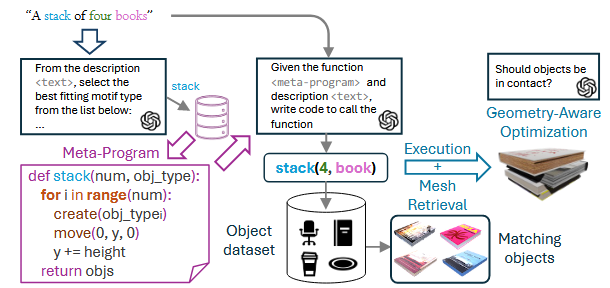
在推理阶段,给定一个新的文本描述,SMC首先从学习到的元程序库中检索出最合适的元程序。
接着,应用该元程序生成相应的3D物体布局。这个布局生成的详细过程是,首先根据每个对象的标签和边界框尺寸从对象数据集中检索mesh,比如从数据集中检索四本书出来。
检索的方式分为两种(这两种方式不能并行使用,论文中默认是第一种使用方法):
1 将该物体的包围盒(bounding box)与所有可用3D模型的尺寸进行对比。然后,根据尺寸差异对所有模型进行排序,从前五个最匹配的模型中随机选一个作为最终用于该物体的3D模型;
2 基于语义描述和图像相似度匹配(使用CLIP模型),将每个物体的文本描述(例如“一个蓝色的陶瓷杯”)与一组3D模型的渲染图像进行对比。使用CLIP模型(如OpenCLIP)来计算描述与渲染图像之间的相似度得分,选择得分最高的模型作为物体的3D模型;
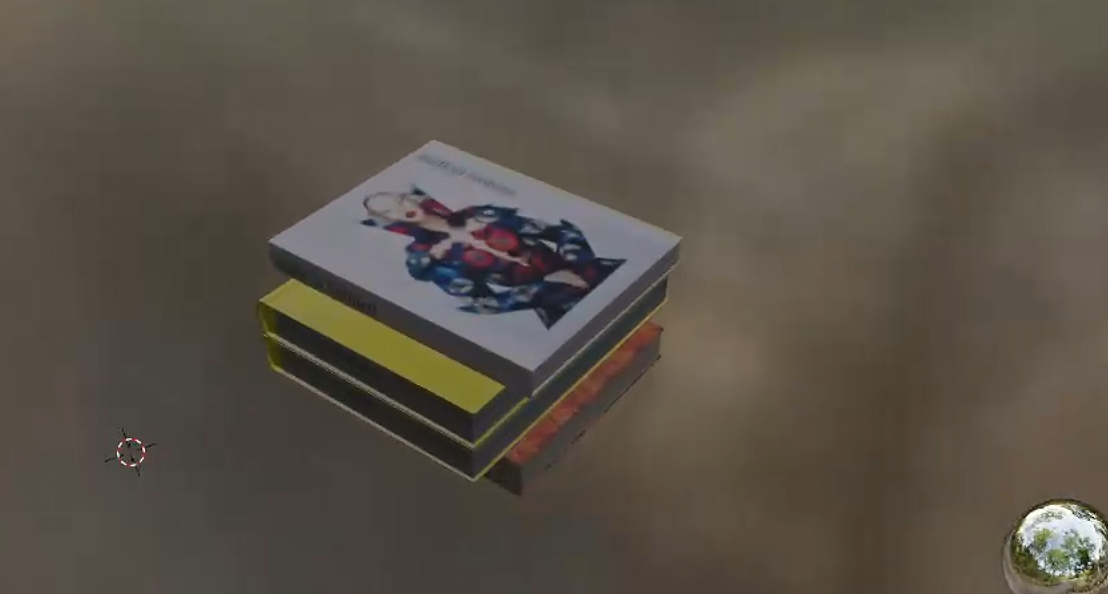
然后问LLM,这四本书的旋转方向是否可以不同(下图的例子就是不一样的旋转);
然后元程序(例如 Stack(objects=[book1, book2, book3, book4]))会根据“堆叠”的规则来计算每本书在空间中的位置,这样就得到了一个初始的布局,
又因为book1本身就是一个glb文件了,所以可以把四个模型一起合成为glb文件。
最后,为了避免物体之间出现穿透或悬空,SMC还会对整个场景执行一次几何优化,包括:
确保书与书之间正好接触;保持整体物理稳定性(比如最底下那本书不会“悬空”);如果出现尺寸冲突,可能会微调物体间距或缩放某些物体。
最后生成结果如下:
推理框架
整体框架
结果
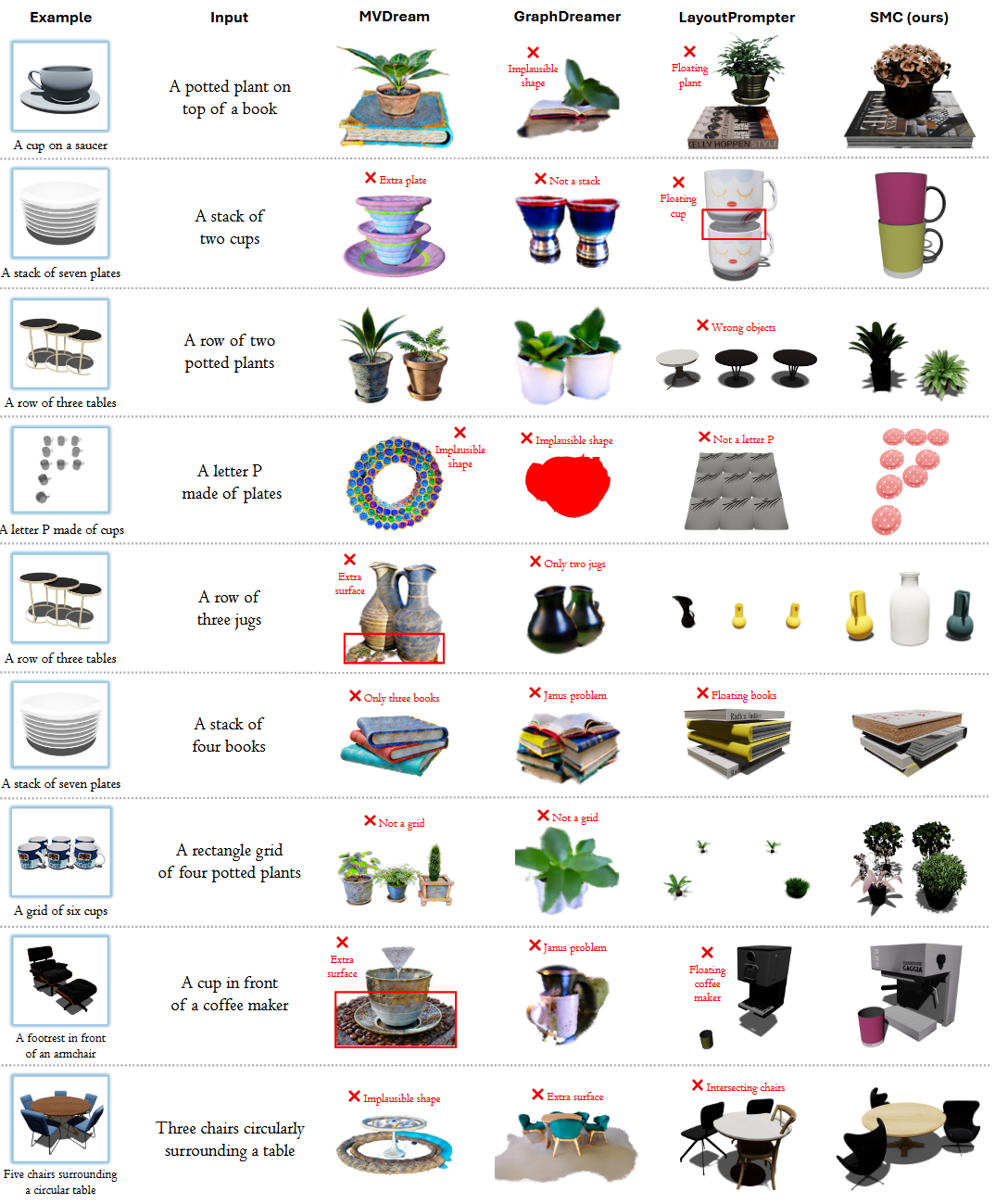
输入同样的文本描述,SMC方法与其他文字生成模型的方法的对比。